Memophant

Workflows

The product as you'd actually use it.

Four journeys that cover most of why you'd open Memophant on a given day. Each is short, each is reviewable, each leaves a commit your future self can read.

Workflow 1

Distill a Claude Code session into memory.

A long Claude Code session produces a transcript. Memophant reads the transcript, proposes durable memory candidates with citations, and shows you a before-and-after diff for every change. You approve what's real; the session log dies; the lesson stays.

  1. 1

    Import the transcript

    Memophant detects every Claude Code session under ~/.claude/projects/<encoded>/ for the current repo. Pick one (or several). The raw JSONL stays gitignored; only the rendered markdown lands in sessions/.

  2. 2

    Scan

    Memophant streams across the transcript building a candidate list — merges into existing notes, new relations, reclassifications. Per-session guardrails (0–3 candidates per session, mandatory citations, token budget) prevent runaway proposals.

  3. 3

    Review & apply

    Every proposed change shows as a before/after diff. Per-finding approve or skip. Applied changes flow through the same secret-scan + commit pipeline as a manual write — the lesson is in the repo, signed and timestamped.

Consolidate scan — Memophant streams across the transcript building memory candidates.
Consolidate review — proposed changes shown as before/after diffs with approve/skip controls.

Outcome — One commit per distillation, scoped to .memory/, with a deterministic Conventional Commits message. The next session opens already knowing what the last one learned.

Workflow 2

Consolidate to keep memory healthy.

Over weeks, atomic notes accumulate. Some get superseded; some duplicate each other; some say things the code no longer does. Consolidate runs a structured pass — merge, update, supersede, extract — with full review at every step.

  1. 1

    Health pass

    Memophant runs MemoryHealthService to identify stale notes (drift from source_paths), duplicate clusters, deprecated content, and dead [[links]]. The pass returns a structured input the consolidation engine can act on.

  2. 2

    Propose changes

    Two engines available: the Claude API engine (fast, structured-output) and the claude -p CLI engine (read-only, audits against the actual code via Read/Grep/Glob). Both emit the same ops JSON — merge, update, supersede, extract observations, resolve.

  3. 3

    Approve and commit

    Per-op review with edit-in-place. Applied changes run through the secret-scan. One commit summarizing the consolidation, with source_sha re-baselined on every touched note so the next health pass starts clean.

Outcome — Memory stays a tight working set instead of a growing pile. Token cost per session stays flat as the project ages.

Workflow 3

Run agentic memory work with Claude.

Some memory work is more efficient when delegated. Audit drift, draft a wiki page, propose a consolidation, scan a session for follow-ups. Queue them as tasks. Memophant runs them with the right prompt, the right tools, and a streaming log — and you review the result.

  1. 1

    Create the task

    A task in TASKS.md can be planned with Claude (generates a plan in tasks/<id>.md) and then run with Claude (executes against the plan). Tools are scoped to the memophant allowlist — read-only audit mode by default; write access requires explicit per-op approval.

  2. 2

    Watch it run

    The task card streams Claude's output live. You see exactly what files it's reading, what queries it's running, and what changes it proposes. A running pulse on the tier switcher tells you something is in flight from any view.

  3. 3

    Review the diff

    Run completes. Memophant shows the proposed changes against your tree. Approve or revise. Approved changes flow through the secret-scan + commit pipeline — same gate as a human edit.

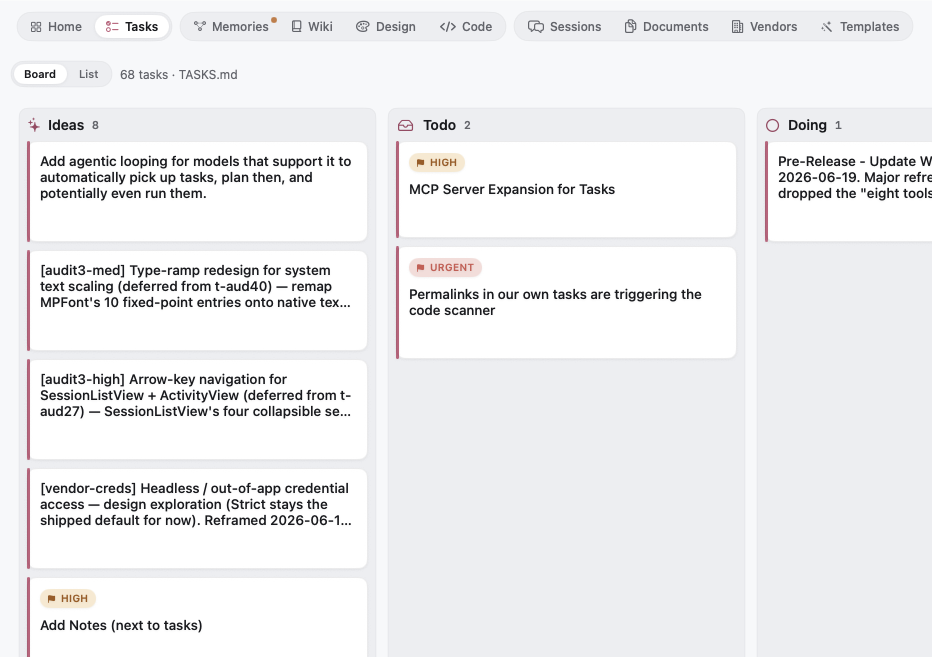
Tasks board with a running task showing live Claude output in the right pane.

Outcome — Background memory hygiene without giving up review. The model does the legwork; the human owns the gate.

Workflow 4

Publish your wiki to GitHub.

The wiki lives in wiki/ in your main repo. GitHub Wikis live in a separate <repo>.wiki.git repo. Memophant bridges them — strip the internal frontmatter, run the two-tier secret-scan, push the result. Until the in-app publish ships, scripts/publish-wiki.sh runs the same flow.

  1. 1

    Edit in Memophant

    Wiki pages are plain markdown — Memophant gives you the reader/editor + linked previews + secret-scan banner if you've typed something that would block the publish. Pages commit with the rest of your work.

  2. 2

    Secret-scan gate

    The same two-tier scan that gates every commit also gates every wiki publish. Hard-tier patterns (OpenAI/Anthropic-style tokens, GitHub PATs, AWS access keys, private keys) block the push. Soft-tier assignments (api_key = '...') warn and require an explicit override.

  3. 3

    Push

    Memophant clones <repo>.wiki.git into .memophant/wiki-publish/, copies wiki/*.md stripping the internal frontmatter, commits, and pushes. The GitHub Wiki at github.com/<owner>/<repo>/wiki shows the updated content within seconds.

Commit sheet showing the two-tier secret scan — blocked tokens, warnings for key-like assignments, with a green allow-to-commit button.

Outcome — A public-facing wiki that stays in sync with the source-of-truth markdown in your repo. No copy-paste, no rot.

Every workflow lands a commit.

Memory work is real work. It should look like real work in your git history — atomic, reviewable, attributable to a session. That's how memory stops being a side-effect and starts being the product.